
Save Any Facebook
Video in HD
Copy the link of any public Facebook video, paste it below, and this Facebook video downloader is handing you the MP4 straight from Facebook's servers. No watermarks, no re encoding, no account needed, and it is working the same on a phone as on a desktop.
Free. No signup. HD and SD quality.
From Link to File in One Step
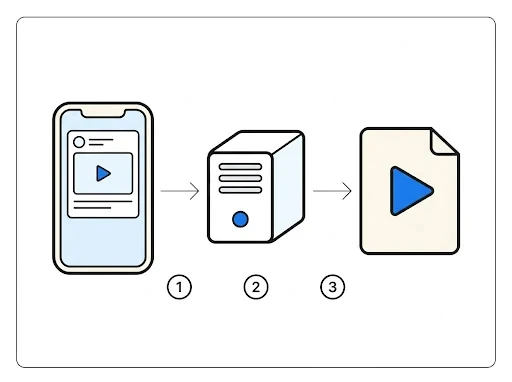
When you paste a link, we open the same video page Facebook serves to a normal browser and pull out the direct MP4 file address from it. That address points at Facebook's own content servers, so the download comes straight from the source at full speed.
Nothing is uploaded, converted, or stored on our side. The file you save is byte for byte the file Facebook streams to viewers.
HD When Facebook Has It
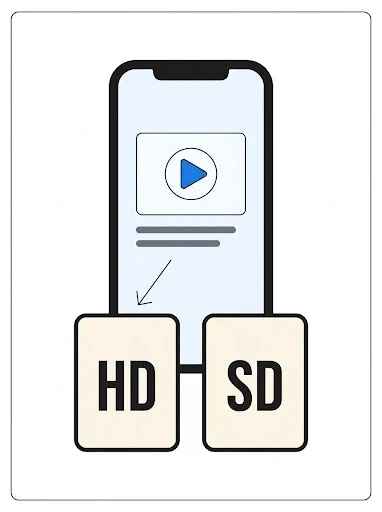
Most videos come in two versions: 720p HD and 360p SD. We show you both so you can pick between quality and file size. Some older or low resolution uploads only exist in SD, and in that case SD is the original quality, not a downgrade.
Every file is a complete MP4 with video and audio together. No separate audio tracks to merge, no broken fragments.

Any Video Link Works
facebook.com/watch/?v=...Classic watch page links from desktop or mobile browser
facebook.com/share/v/...Share links copied from the Facebook app share sheet
fb.watch/...Short links Facebook generates when you tap copy link
facebook.com/{page}/videos/...Direct video links from a page or profile video tab
When a Video Will Not Download
Private or Friends Only Videos
If a video is limited to friends or a private group, it is not publicly reachable and we cannot fetch it. Only public videos work.
Deleted or Expired Posts
If the post was removed after you copied the link, there is nothing left to download. Paste a fresh link to check.
Ongoing Live Streams
A live broadcast has no finished file yet. Wait until the stream ends and Facebook publishes the replay, then use that link.
Regional Restrictions
Some videos are blocked in certain countries by the uploader. We retry through several regions automatically, but a few stay out of reach.
Where the File Is Going After You Press Download
Understand the availability part first, because it is the part people are getting wrong. Facebook is not storing one video, it is storing several renditions of the same upload and picking one for each viewer based on their connection. A phone on weak data is getting the 360p file, a laptop on fibre is getting 720p, and the uploader is choosing none of it. Picazor is reading the page once and listing every rendition Facebook is holding for that post, so the HD button is showing only when an HD file exists on Facebook's side. If the button is not there, the uploader gave Facebook an SD file and there is no bigger one anywhere, whatever another downloader is promising.
Then the download itself. Nothing is going through a converter and nothing is waiting in a queue on our end. Your browser is opening a stream from Facebook's content servers, through our pipe, straight into its own downloads folder. Which folder that is depends on the browser, and this is where the support emails are coming from, so here it is plainly.
Chrome on Windows and Mac
Chrome is saving the MP4 into the Downloads folder without asking, and the little file chip is showing in the toolbar while it runs. If you would rather pick the folder each time, open chrome://settings/downloads and switch on Ask where to save each file before downloading. The file is a normal MP4, so any player is opening it, the built in Movies and TV app on Windows, QuickTime on Mac, VLC anywhere.
Firefox
Firefox is doing the same, Downloads folder by default, and the arrow icon in the toolbar is filling up while the transfer is running. The setting to change it is under Settings, General, Files and Applications, tick Always ask you where to save files. One Firefox habit worth knowing, if a download is showing as failed straight away, it is usually the Facebook link that expired rather than the browser. Paste the post link again on this page and the new buttons are carrying a fresh file address.
Android and iPhone
On Android, Chrome is putting the video in Downloads and the Files app is finding it under that name, and from there the share sheet is offering WhatsApp, Drive, the gallery. On iPhone, Safari is saving into Files, in the Downloads folder under On My iPhone or iCloud Drive. To get it into your camera roll, open the file in Files, tap share, then Save Video. The file name is starting with picazor so it is easy to find in the pile.
Every file is complete, video and audio together in one MP4, and it is the same file Facebook is streaming to viewers, byte for byte. Rename it, move it, put it on a drive, it is yours to keep. The one thing we cannot do is put it in your camera roll for you, the browser is not allowing that from a web page, and any site claiming otherwise is asking you to install something. Do not.