
Download Facebook
Stories Before They Vanish
Paste a Facebook story link into the story downloader and every active story on that profile is showing up below, video and photo both, saved anonymously with no view left behind. Pick the ones you want and keep them past the twenty four hours.
Free. No signup. The poster is seeing no view from us.
How to Copy a Facebook Story Link
Open the story you want to save in the Facebook app or on the desktop site and tap the three dots in the top right corner of the story.
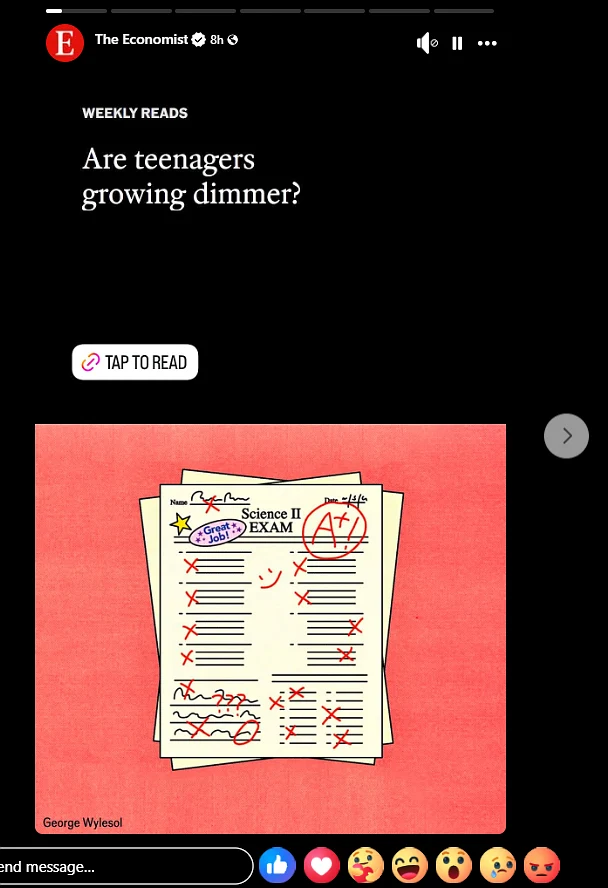
Tap Copy link to share this story. Facebook is putting the story link on your clipboard, the one with stories in the address.
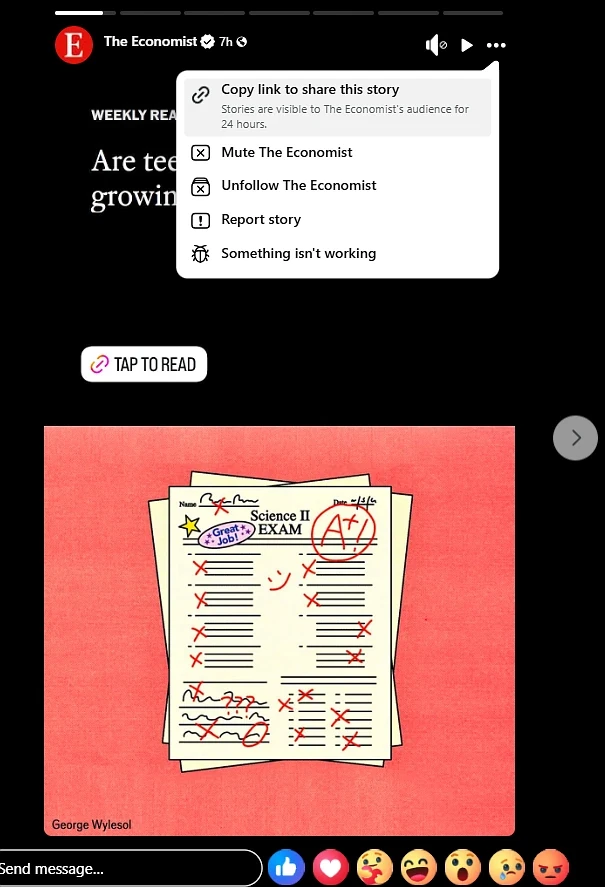
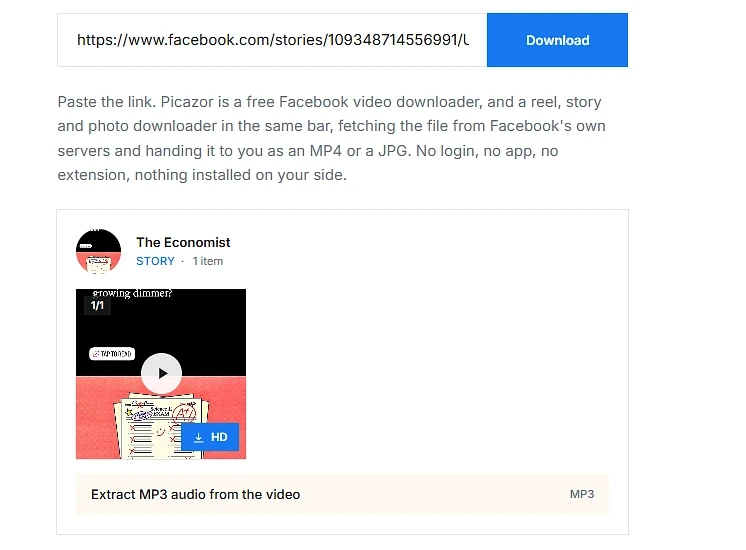
Paste it into the bar above and press Download. Every active story from that profile is listing itself below, pick the ones you want.
What Is Possible With Stories, and What Is Not
Stories are the one Facebook format with a clock on them, so half of the questions we are getting are about time. Here is the list, both sides, with no maybe in it.
Stories on public profiles and pages that are still inside their twenty four hours. Paste the story link and the whole tray is coming back, not only the one you tapped.
Video stories and photo stories both. Videos are saving as MP4 with the sound inside, photos as JPG at the size Facebook is holding.
A reel someone shared into their story. The story itself is carrying no file, so we are following it to the reel and handing you the main video from there.
No view registered. The fetch is happening from our side, not from your account, so the poster is seeing no name on the viewer list.
Expired stories. Once the twenty four hours are up the file is gone from Facebook's servers, and the link you saved is pointing at nothing. No tool is bringing it back.
Stories from private accounts or from a close friends list you are not on. If Facebook is not showing it to the public, it is not showing it to us either, by design.
A profile link on its own. The View story button inside a profile is revealed by a click and we are not automating that click. Copy the story link itself, the steps above are showing where.
Locked profiles. Facebook's profile lock is hiding stories, photos and the profile picture from everyone outside the friend list, and that includes a downloader.
A Story Is a Normal File With a Clock on the Post
Understand this first, because it is the thing making stories feel magical and they are not. A story is an ordinary MP4 or JPG sitting on Facebook's content servers, the same servers holding every video on the site. The twenty four hour limit is on the post, not on the file. Facebook is deciding when to stop showing it, and once it stops, the address to the file is being dropped. So the window is real, but inside the window a story is downloading exactly like a video does. Same speed, same quality, same file.
The link is the part people are getting wrong. A story link is carrying two numbers, a bucket and a story id, and the bucket is a lookup Facebook is doing for that profile on that day. It is not the profile id and it cannot be worked out from it, we have tried. That is why a profile link is not enough and why the three steps above are asking you for the story link itself. Paste that one and we are reading the whole tray it belongs to, so a person with five stories up is giving you five buttons from one paste.
But will they know I saved it?
No. The viewer list on a story is filling up when the app is opening the story while signed in as you. Picazor is never signed in as you. The fetch is going out from our server with our own access, so the poster's list is staying exactly as it was. That is also why we are not asking for your Facebook login on this page, or any page. A downloader that is asking you to log in is the one that is showing up on the viewer list, not this one.
Two habits worth keeping. Paste the story the same day you see it, because a story posted at breakfast is expiring at breakfast tomorrow and the link in your notes is worth nothing after that. And if a reel is sitting inside a story, expect one video, the reel itself, not the sidebar of suggestions the reel page is carrying, we are taking the main clip only.
The Questions People Are Asking Before They Paste a Story Link
Can I Download a Story Without the Person Knowing?
Yes, and this is the one people are whispering when they ask it. The viewer list on a story is filling up when the Facebook app opens the story while signed in as you. Picazor is never signed in as you. The fetch is going out from our server, so the list is staying exactly as it was. No view, no name, no notification.
Why Is a Profile Link Not Enough?
Because the story link is hiding behind a click. On a profile, the View story button is revealed only when the profile picture is tapped, and the link it carries has a bucket number that is not the profile id and cannot be worked out from it. So copy the story link itself, the three steps above are showing where, and paste that one.
What Happens After the Twenty Four Hours?
The file is gone from Facebook's servers and the link you saved is pointing at nothing. Not hidden, not archived for outsiders, gone. Facebook is keeping an archive for the person who posted it, and only for them. So the habit is simple, paste it the day you see it.
Can I Save Every Story on a Profile at Once?
One paste is giving you the whole tray, so a profile with six stories up is showing six thumbnails and six buttons. Each button is one file. There is no single zip yet, that is on the list, but six clicks for six stories is the honest state of it today.
Does It Work for Page Stories as Well as Profiles?
Yes. A public page is putting its stories on the same servers in the same shape, so a page story link is downloading the same way. Private groups are the exception, if the group is closed, its stories are closed to us too.
Is a Video Story Different From a Photo Story?
Only in the file you get. A video story is coming out as an MP4 with the sound inside, usually the 720p Facebook is serving. A photo story is coming out as a JPG at the size Facebook is holding. The thumbnail under each one is telling you which before you click.
Stories are the one with the clock. The rest of Facebook is waiting for you.